
This is a very common asp.net interview question asked in many interviews. There are several reasons for the page being slow. We need to identify the cause.
1. Find out which is slow, is it the application or the database : If the page is executing SQL queries or stored procedures, run those on the database and check how long do they take to run. If the queries are taking most of the time, then you know you have to tune the queries for better performance. To tune the queries, there are several ways and I have listed some of them below.
a) Check if there are indexes to help the query
b) Select only the required columns, avoid Select *.
c) Check if there is a possiblity to reduce the number of joins
d) If possible use NO LOCK on your select statements
e) Check if there are cursors and if you can replace them with joins
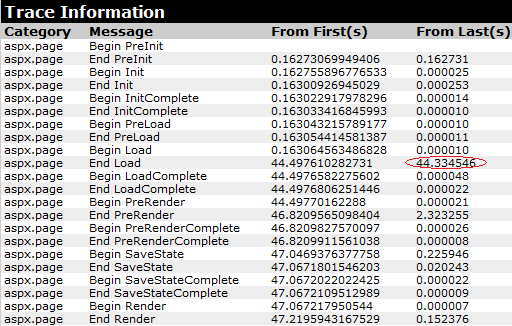
2. If the queries are running fast, then we know it is the application code that is causing the slowness. Isolate the page event that is causing the issue by turning tracing on. To turn tracing on, set Trace="true" in the page directive. Once you have tracing turned on you should see trace information at the bottom of the page as shown in the image below. In this case Page Load event is taking the maximum time. So we know, the code in Page_Load event is causing the issue. Once you look at the code, you should be able to nail down the issue.
1. Find out which is slow, is it the application or the database : If the page is executing SQL queries or stored procedures, run those on the database and check how long do they take to run. If the queries are taking most of the time, then you know you have to tune the queries for better performance. To tune the queries, there are several ways and I have listed some of them below.
a) Check if there are indexes to help the query
b) Select only the required columns, avoid Select *.
c) Check if there is a possiblity to reduce the number of joins
d) If possible use NO LOCK on your select statements
e) Check if there are cursors and if you can replace them with joins
2. If the queries are running fast, then we know it is the application code that is causing the slowness. Isolate the page event that is causing the issue by turning tracing on. To turn tracing on, set Trace="true" in the page directive. Once you have tracing turned on you should see trace information at the bottom of the page as shown in the image below. In this case Page Load event is taking the maximum time. So we know, the code in Page_Load event is causing the issue. Once you look at the code, you should be able to nail down the issue.

